For a wedding surprise that requires offline playback on a DJ's laptop, the ability to download your generated song as an MP3 file is essential. Words into Music provides direct MP3 downloads, so you can save the file before the event. Udio, as of our research, currently has download restrictions that would prevent this specific use case.
Words into Music publishes this comparison and sells one of the products discussed. We reviewed official public pages on October 17, 2026. We did not run a matched listening test or paid competitor tests. Vendor demos are not our own test results.
The value of a downloadable audio file
Imagine preparing a special song for a wedding, only to discover on the day itself that you cannot transfer the audio file to the DJ's equipment because downloads are restricted. This scenario highlights a fundamental difference in how AI music tools deliver their output. For events requiring offline playback, such as a wedding reception, a live performance, or any situation without reliable internet access, possessing a downloadable audio file is non-negotiable.
Words into Music is designed to provide you with complete songs as MP3 files. This means that once your song is generated, you can download it and use it on any device that supports MP3 playback, including a DJ's laptop, a personal music player, or a USB drive. Download the file beforehand and test it on the equipment you will use at the event.
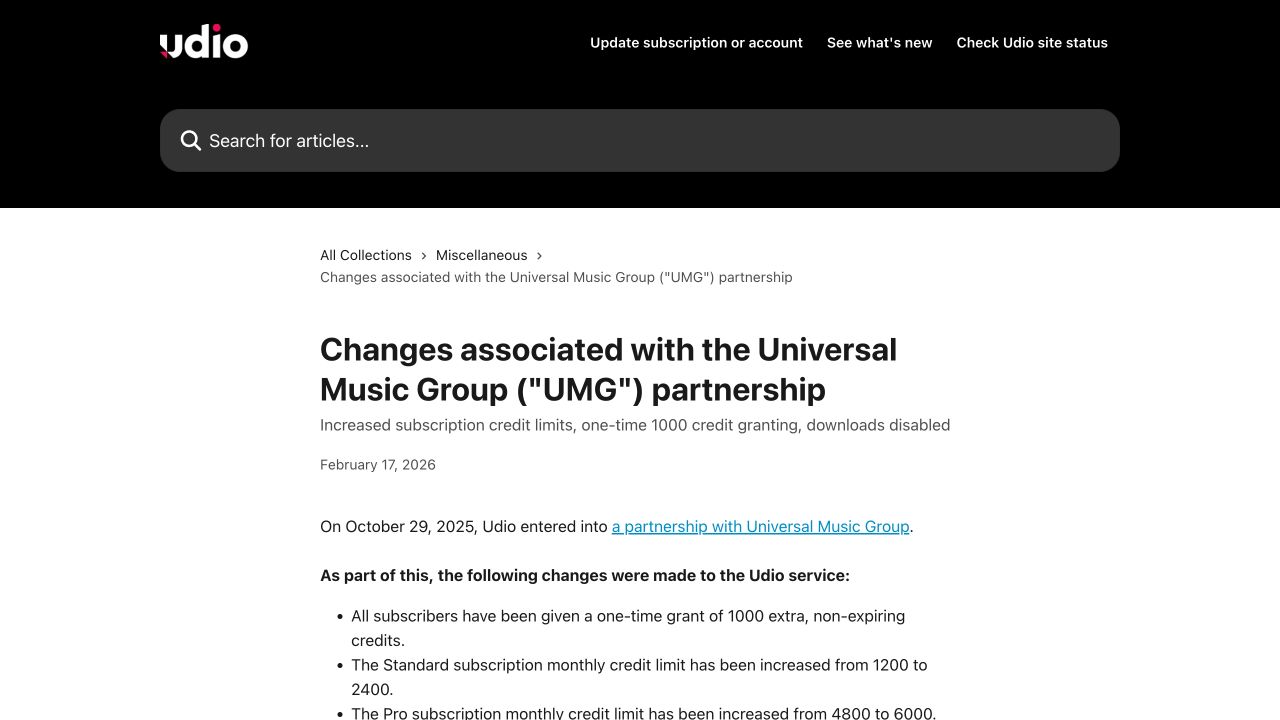
In contrast, Udio's official help article, "Changes associated with the Universal Music Group (UMG) partnership," states: "Downloading audio, video and stems is disabled" Udio Help Article. This statement was current as of our research on October 17, 2026. While you might be able to create and share music within the Udio platform, you cannot currently download the audio file for offline use or transfer it to external devices. For a wedding surprise that absolutely must play offline, this distinction is critical.
Words into Music: your downloadable song creator
Words into Music focuses on delivering complete songs you can download. The process begins with an idea or supplied lyrics, allowing for an editable lyric draft before any audio generation occurs. You can guide the musical direction and select the song language from five options: English, Spanish, German, French, and Brazilian Portuguese. Songs are typically one to three minutes in length.
A private library stores your creations, allowing for playback and organization into favorites. every generated song includes an MP3 download, giving you full possession of the audio file. This is fundamental for scenarios like the wedding surprise, where the audio must be independent of any online platform.
Words into Music provides a free account that allows for one total song, including an MP3 download, with no credit card required. Monthly subscription tiers include Starter at USD $9.99 for 30 songs, Creator at $19.99 for 65 songs, and Studio at $39.99 for 150 songs. A one-time 20-song pack is available for $9.99, requiring no subscription. MP3 downloads are included with all plans.
Udio's in-platform experience and current limitations
Based on the available information, Udio appears to offer an in-platform experience for creating and sharing music. While it allows users to generate songs, the current restriction on downloading audio, video, and stems means its primary utility is within its own ecosystem. This can be suitable for sharing tracks directly with other users on the platform or for personal listening within the application. However, for situations demanding an exportable, offline-ready file, this limitation becomes a significant barrier.
For creators who primarily share their work online within a specific community or platform, Udio's approach might be sufficient. But for those who need to integrate their AI-generated music into broader projects, live events, or traditional media, the inability to download the actual audio file presents a challenge.
Feature comparison for offline use
Here's a direct comparison of features relevant to the scenario of needing an offline audio file:
| Decision | Words into Music | Udio |
|---|---|---|
| Starting point | An idea or supplied lyrics | Song prompt |
| Main output | A complete song with vocals and music | In-platform recordings |
| Revision | Edit lyrics before generating audio | Verify current account tools |
| File access | MP3 in your private library | Official help says downloads disabled |
| Cost to understand | One free song total; plans and packs | Credits do not establish export access |
| Best fit | A personal song without a production setup | Listening and sharing within the service |

Proposed test: the wedding day surprise
To illustrate the difference in utility, consider this brief:
Scenario: A surprise song for a wedding couple, to be played by the DJ during the reception. The song needs to be a heartfelt ballad, approximately two minutes long, incorporating specific lyrics about their journey together. The DJ's setup is offline, and the song must be delivered as a standard audio file (MP3) in advance.
Words into Music Workflow:
- You would input your lyrics or an idea into the Words into Music browser-based tool.
- Refine the editable lyric draft to ensure all key phrases are present.
- Select a musical direction suitable for a heartfelt ballad and choose English as the song language.
- Generate the song, which will be between one and three minutes long.
- Once satisfied, you would download the MP3 file directly from your private library.
- This MP3 file can then be easily transferred to a USB drive or emailed to the DJ, ready for the wedding day.
With this workflow, the song is not only created but also made available in a format that meets the specific requirements of an offline event.
Choosing the right tool for your needs
If your primary need is for downloadable MP3 files for offline playback or integration into other projects, Words into Music directly fulfills this. Its design prioritizes giving you a tangible audio asset that you can use independently of any online platform. This is particularly important for events where internet access cannot be guaranteed or for projects requiring traditional file handling.
Despite the current download restrictions, there may be reasons to continue using Udio, especially if your needs align with its specific offerings. If your primary use case involves sharing music directly within the Udio platform or its connected communities, and offline file possession is not a priority, Udio might still serve your needs. Udio may also offer unique features or a user experience that aligns with your creative process, provided these do not rely on audio downloads. download restrictions are subject to change, and if Udio reinstates audio downloads in the future, its utility for offline scenarios would naturally expand.
different AI music generation tools are often designed to solve different problems. Words into Music is built for creators who need to produce complete songs from text and require the flexibility of a downloadable MP3 file for use in various contexts, including offline events. Its focus is on providing a tangible audio asset.
Udio, with its current download limitations, appears to prioritize an in-platform experience, where creation and sharing occur within its ecosystem. While both tools generate music, their output formats dictate their suitability for different tasks. For a critical event like a wedding surprise that demands an offline, portable audio file, the distinction between in-platform playback and a downloadable MP3 is paramount.
For more details on our pricing structure, visit our pricing page.
Ready to create your own downloadable songs?
Browse all music-tool comparisons.
Explore how to turn lyrics into a song with our tools.
Product information checked October 17, 2026: Udio official information.
Frequently asked questions
What are the current export limitations for Udio songs?
As of October 17, 2026, Udio's official help article states: 'downloading audio, video and stems is disabled.' This means you cannot currently export your creations as files for external use.
Why is it important to distinguish between in-app playback and possessing an MP3 file?
In-app playback allows you to listen to your song within a platform, often requiring an internet connection. Possessing an MP3 file means you own a copy that can be played offline on any compatible device, like a DJ's laptop, without internet access.
How does Words into Music address the scenario of needing music for a wedding surprise?
Words into Music provides you with a downloadable MP3 file of your custom song. This ensures you can play it offline on a DJ's laptop or any other device without internet access, preventing last-minute issues on the wedding day.
Does Words into Music make claims about Udio's audio quality?
No, this comparison focuses solely on the ability to export and possess a downloadable file for offline use, not on the audio quality of Udio's generated tracks.
Can I import existing Udio recordings into Words into Music to get a downloadable file?
No, our text-to-song workflow does not support importing or preserving existing Udio recordings. Words into Music creates new custom songs based on your provided lyrics and instructions.
How does Words into Music ensure my custom song can be used at an offline event?
Words into Music delivers your completed song as a standard MP3 file. This file is yours to download and use on any device, so you can play it offline at events like weddings, regardless of internet availability.